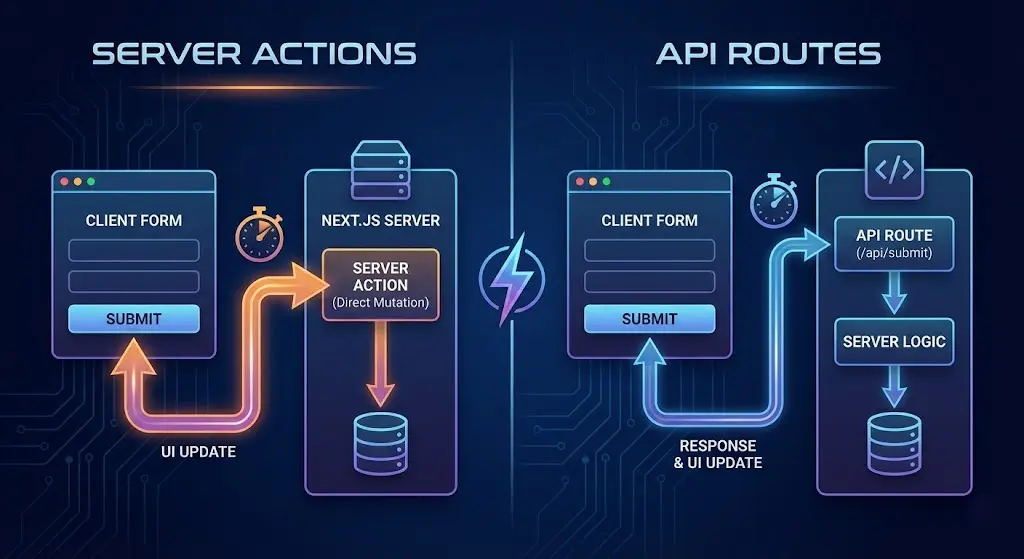
For years, building a form in a Next.js application followed a familiar, albeit verbose, pattern. You created an API route (e.g., pages/api/submit.ts), wrote a handler function, and then on the frontend, you wired up a fetch request, managed loading states, handled serialization, and prayed the types matched up on both ends.
It worked, but it felt like a lot of friction for something as simple as saving a contact form.
With the release of Server Actions, Next.js has challenged this status quo. By leveraging the power of React Server Components, Server Actions allow you to invoke server-side functions directly from your components, effectively treating the backend as a library you can import.
But does this mean API routes are dead? When should you use one over the other?
This guide will break down the differences between Server Actions vs. API Routes, compare their workflows side-by-side, and show you how to streamline your form submissions in 2026.
The "Old" Way: The API Route Dance 💃
Let's look at what we're moving away from. To handle a simple newsletter signup, you traditionally needed two distinct files and a lot of glue code.
1. The Backend (pages/api/newsletter.ts)
import type { NextApiRequest, NextApiResponse } from 'next';

export default async function handler(req: NextApiRequest, res: NextApiResponse) {
  if (req.method === 'POST') {
    const { email } = req.body;
    // Validate and save to DB...
    res.status(200).json({ message: 'Success' });
  } else {
    res.status(405).end();
  }
}
2. The Frontend (components/Newsletter.tsx)
export function Newsletter() {
  const [email, setEmail] = useState('');

  const handleSubmit = async (e) => {
    e.preventDefault();
    await fetch('/api/newsletter', {
      method: 'POST',
      headers: { 'Content-Type': 'application/json' },
      body: JSON.stringify({ email }),
    });
  };

  return <form onSubmit={handleSubmit}>...</form>;
}
The Friction:
- Context Switching: You are constantly jumping between frontend and backend files.
- Loose Typing: Unless you share types manually, the frontend doesn't know if the backend expects
emailoruserEmail. - Boilerplate: You have to manually handle HTTP methods, headers, and serialization.
The New Way: Server Actions 🚀
Server Actions abstract away much of the HTTP boilerplate. You write a function that runs on the server and invoke it from a component, but the resulting server endpoint still needs explicit validation and access control. The distinction matters when securing Server Actions against unauthorized record updates.
The Code (components/Newsletter.tsx)
import { db } from '@/lib/db'; // Import server-side code directly!

export default function Newsletter() {
  // Define the action directly in the component (or import it)
  async function subscribe(formData: FormData) {
    'use server'; // This directive makes it a Server Action

    const email = formData.get('email');
    await db.newsletter.create({ data: { email } });
  }

  return (
    <form action={subscribe}>
      <input name='email' type='email' />
      <button type='submit'>Subscribe</button>
    </form>
  );
}
The Benefits:
- Zero API Boilerplate: No
req,res, or HTTP status codes to manage. - Progressive Enhancement: Because it uses the native
<form action>, it works even if JavaScript hasn't loaded yet. - Type Safety: The arguments and return types are inferred automatically.
This shift significantly reduces the cognitive load required to build features, allowing you to focus on logic rather than plumbing. It effectively answers the question of how much backend knowledge you need by integrating it seamlessly into the frontend workflow.
When to Use Which?
While Server Actions are fantastic for mutations triggered by the UI, API Routes (now called Route Handlers in the App Router) still have a vital role.
| Feature | Server Actions | API Routes (Route Handlers) |
|---|---|---|
| Form Submissions | ✅ Best Choice. Handles validation, loading states, and redirects seamlessly. | ❌ Verbose. Requires manual fetch and state management. |
| Data Mutations | ✅ Best Choice. Call directly from button clicks or event handlers. | ❌ Requires defining an endpoint and fetching it. |
| Webhooks | ❌ Cannot be triggered by external services (like Stripe). | ✅ Best Choice. Designed to listen for external HTTP requests. |
| Public API | ❌ Not designed for external consumers. | ✅ Best Choice. Use this to build a REST API for your mobile app or third parties. |
| Complex Headers | ❌ Harder to manipulate specific response headers. | ✅ Full control over Request and Response objects. |
Advanced: Combining with useActionState
For real-world forms, you need feedback (validation errors, success messages). In Next.js, the useActionState hook (formerly useFormState) bridges the gap between Server Actions and client-side state.
'use client';

import { useActionState } from 'react';
import { subscribeAction } from './actions';

const initialState = { message: null, errors: {} };

export function Newsletter() {
  const [state, formAction] = useActionState(subscribeAction, initialState);

  return (
    <form action={formAction}>
      <input name='email' />
      {state?.errors?.email && <p>{state.errors.email}</p>}
      <button>Subscribe</button>
    </form>
  );
}
This pattern gives you the best of both worlds: the simplicity of server-side logic with the interactivity of client-side feedback. It creates a robust cycle of data flow that is essential for avoiding common React mistakes.
Conclusion
Server Actions are not just a syntactic sugar; they are a paradigm shift in how we architect Next.js applications. By treating backend logic as callable functions, they eliminate an entire layer of complexity associated with API routes.
For internal data mutations and form submissions, Server Actions are now the default. They reduce code, improve type safety, and leverage the platform's native capabilities. Save API Routes for what they do best: communicating with the outside world (webhooks, mobile apps, and public APIs). By mastering both, you become a versatile full-stack engineer ready for anything.