When building a custom WordPress site, you often need to go beyond standard "Posts" and "Pages." You might need to manage a portfolio, a team directory, a product catalog, or a schedule of events.
Two tools dominate this conversation: Custom Post Types (CPT) and Advanced Custom Fields (ACF).
For beginners, the line between them can blur. "Should I create a 'Team Member' post type, or just add an ACF repeater to the 'About' page?" "Do I need a CPT for testimonials?"
The answer isn't always straightforward. It's not about "ACF vs. CPT" but rather "ACF and CPT." They are two halves of a whole. Understanding how they interact is the key to architecting complex content structures that are scalable, performant, and easy for clients to manage.
This guide will demystify these concepts, providing a clear framework for when to use which tool (and when to use both).
The Foundation: Custom Post Types (CPT) 🏗️
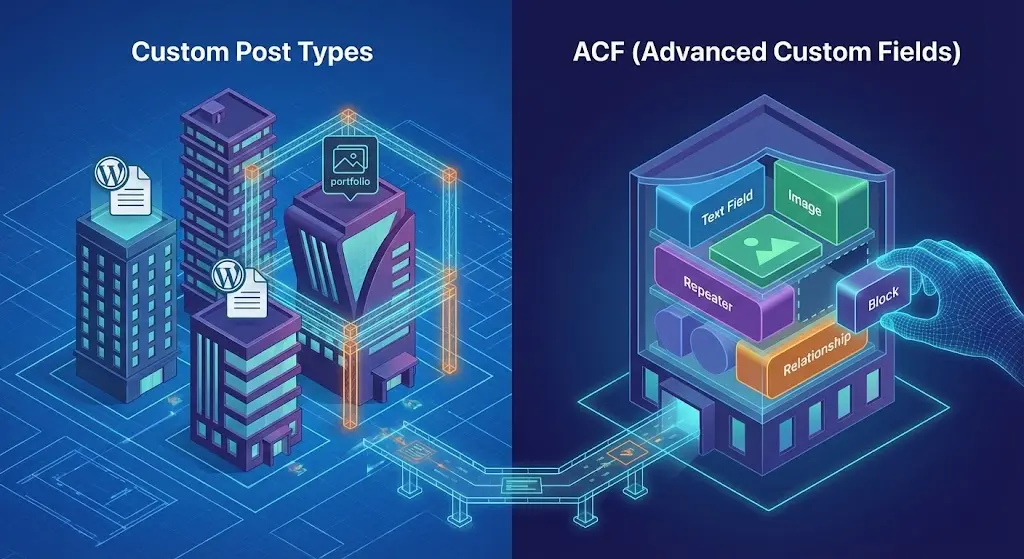
Think of a Custom Post Type as a container. It creates a new section in the WordPress admin menu, separate from "Posts" and "Pages."
When to use a CPT: You should create a Custom Post Type whenever you have a piece of content that:
- Needs its own URL structure: Do you want
example.com/movies/inception? Then "Movies" should be a CPT. - Has many entries: If you have 50 team members, you don't want to manage them all in a single page editor. You want a list view where you can add, edit, and delete them individually.
- Needs to be queried separately: If you want to show "Latest Movies" in a sidebar, having a dedicated CPT makes the database query efficient and straightforward.
Analogy: A CPT is a new filing cabinet. If you have "Invoices," you don't stuff them in the "Letters" drawer; you buy a new cabinet labeled "Invoices."
The Details: Advanced Custom Fields (ACF) 📝
Think of Advanced Custom Fields as the data inside the container. By default, a WordPress post has a Title and a Content Editor (the Block Editor). But real-world data is structured.
When to use ACF: You use ACF when the standard title and body fields aren't enough.
- Structured Data: A "Movie" CPT needs fields for "Director," "Release Year," "Rating," and "Trailer URL."
- Page-Specific Settings: You might add an ACF field to a specific Page template to toggle a hero banner on or off.
- Relationships: You can use an ACF Relationship field to connect a "Movie" (CPT) to a "Director" (another CPT).
Analogy: ACF is the specific form you fill out inside the file folder. It ensures that every "Invoice" has a "Due Date" and "Total Amount" written in the exact same spot.
The Architecture Pattern: Combining CPT + ACF
The most robust WordPress sites use a combination of both. Let's look at a practical example: A Real Estate Website.
Scenario 1: The "Lazy" Way (ACF Repeater only)
You create a page called "Listings." You add an ACF Repeater field to this page where the editor can add a photo, price, and address for each house.
- Pros: Quick to set up.
- Cons: Unscalable. If you have 100 houses, the page editor becomes slow. You can't easily link to a specific house (
/listings/house-1). You can't filter by price easily. This is bad architecture.
Scenario 2: The "Architect" Way (CPT + ACF)
- Create a CPT called "Listings" (
listing). Now you have a dedicated menu item in the admin. - Create an ACF Field Group assigned to the "Listings" post type. Add fields for:
- Price (Number)
- Bedrooms (Number)
- Gallery (Gallery field)
- Agent (Relationship field linking to "Team" CPT)
- Pros: Infinite scalability. Each house has its own URL. You can run complex database queries (e.g., "Show me all listings under $500k"). The editing experience is clean and organized.
A Note on Headless WordPress
If you are building a Headless WordPress site with Next.js, this architecture becomes even more critical.
- CPTs map directly to your GraphQL schema (e.g.,
query { listings { nodes { ... } } }). - ACF Fields provide the structured data payload within those nodes.
Without a clear CPT structure, your GraphQL queries becomes messy and difficult to manage.
Conclusion
The rule of thumb is simple: If the content represents a repeatable "thing" (a person, a project, a product, an event), it deserves a Custom Post Type. Once that "thing" exists, use ACF to define the specific attributes that describe it.
By following this separation of concerns—CPT for structure, ACF for details—you build a backend that is intuitive for your editors and a database that is performant for your developers. This is the hallmark of a professional WordPress architecture.